TROUBLESHOOTING // DIAGNOSTIC MODE#
> RUNNING DIAGNOSTICS...> SCANNING FOR KNOWN FAULTS...
Something broke? Start here before pinging staff in Discord — most issues have already been solved once.
Troubleshoot/Diagnostics#
-
Known issues and their fixes, maintained by staff.
-
Step-by-step guide to isolating exactly which mod is causing your crash or issue.
-
Every shortcut phrase Choomba Bot auto-replies to in Discord, all in one searchable list.
GitHub Issues Tracker#
-
Live-synced view of open GitHub issues for the collection.
-
Live-synced view of closed GitHub issues — see what's already fixed.
Before you report anything#
- Check Common Problems and Issue Archive — your issue is probably already documented.
- Check the Changelog for any outfit/weapon mods that might have been remove that you used. That can cause crashes when loading saves.
- Check the FAQ for quick answers to common questions.
- Confirm you followed every step in Installation, especially the verification checklist.
Don't skip the logs
Have a little browse through some of the logs, it might give you an indication as to what's crashing. Although this is rare, so we recommend a Clean Install or a How To Bisect
📷 Show me
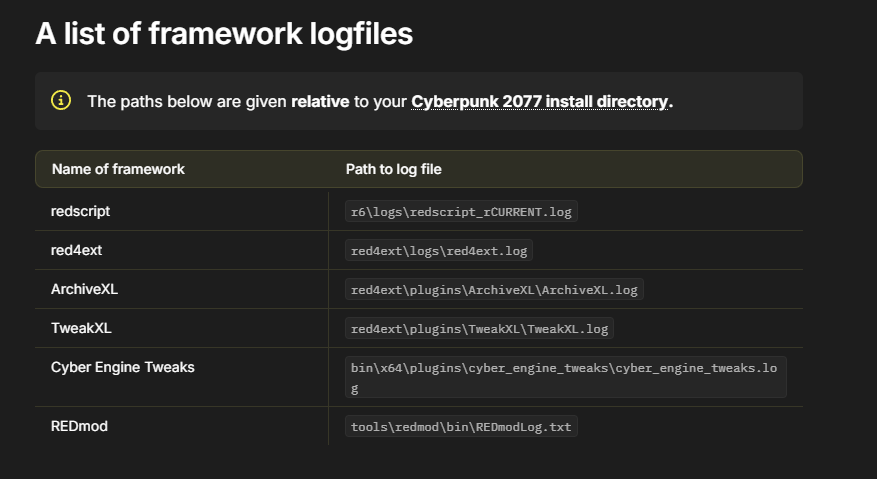
Still stuck? File an issue#
If you've checked the above and you're still stuck, or you've found a bug that isn't documented, file a proper issue on GitHub.
Writing a good bug report
A fast fix starts with a clear report. Include:
- Your Cyberpunk 2077 version and Preem Team collection version
- What Platform are you running the game from (Steam/GOG/Epic Games)
- Exact steps to reproduce the issue (Screenshots/Videos?)
- Have you added any additional mods on top of the collection (This can also be an issue if they conflict with mods inside of the collection)
- Whether the issue happens on a fresh save or an existing one
- What are your hardware specs? (Mainly your CPU/GPU/RAM)
Issues filed without this information take longer to triage — staff will usually ask for it anyway, so including it up front speeds things up considerably.